


A technical deep-dive into building a post-quantum digital signing product on smart cards — focusing on the secure chip, applet model, APDU protocol, CSP/KSP and CryptoTokenKit layers for deployment on Windows and macOS.
Key Topics
- End-to-end architecture of a Quantum Safe card
- Technical boundaries between the card OS, applet, and middleware
- Required changes when migrating from traditional OpenPGP to PQC
- Real-world bottlenecks: APDU, memory, signature format compatibility, and desktop integration
1. Why the Quantum Safe Card Model Has Real Technical Significance
In many post-quantum migration programs, the challenge is not in selecting the right algorithm in theory, but in deploying that algorithm into real operational environments: smart cards, readers, desktop middleware, signing applications, signature package formats, and existing business workflows.
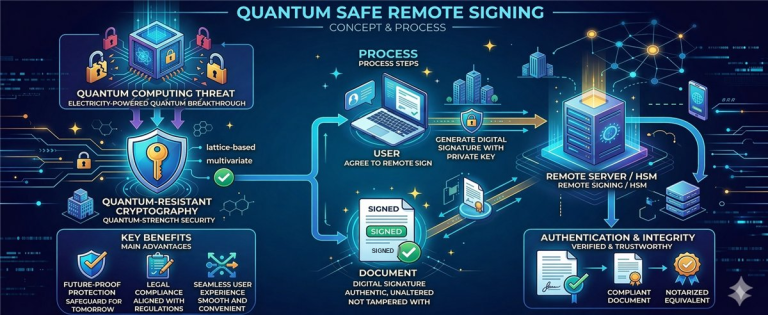
For smart card-based products, the goal is not merely to “have ML-DSA on the chip,” but to create a complete operational chain: the application calls the middleware, the middleware calls the card, the applet invokes the PQC cryptographic function, and the result is packaged into a signature format that enterprise ecosystems can consume.
2. Overall Technical Architecture
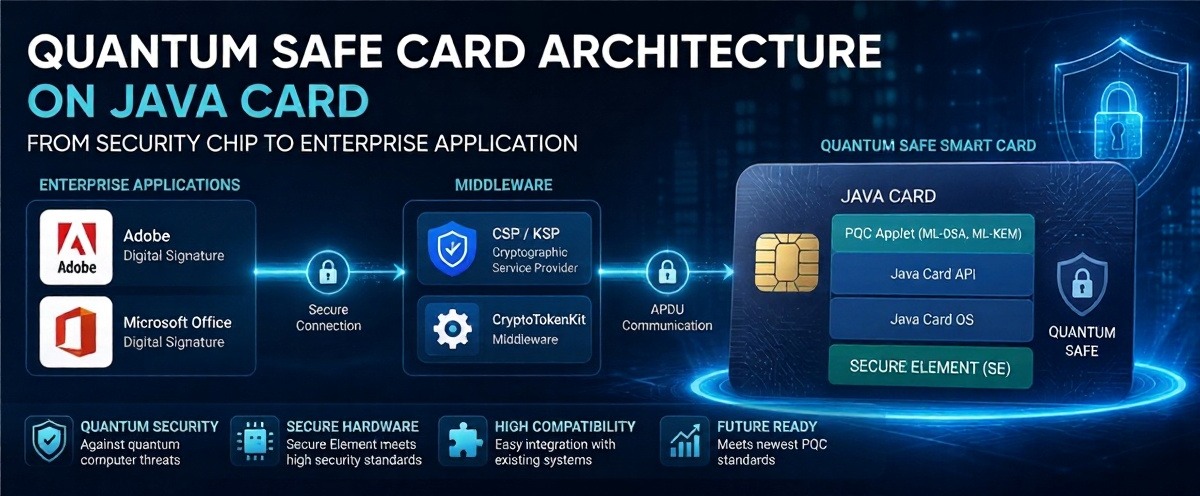
A Quantum Safe card implementation based on Java Card / JavaCOS is typically divided into 5 distinct layers:
- Silicon / Secure Controller Layer: provides secure hardware, key storage zones, hardware accelerators, or low-level cryptographic libraries.
- Card Operating System Layer (JavaCOS): manages application lifecycle and provides the APIs or cryptographic functions required by the applet.
- PQC Applet Layer: responsible for the object model design, command set, and on-card business logic.
- Desktop Middleware Layer: bridges the smart card with Windows CSP/KSP or macOS CryptoTokenKit.
- Business Application Layer: Adobe Acrobat, Microsoft Office, internal signing software, and enterprise workflow systems.
Figure 1: End-to-end architecture of the Quantum Safe card system — from application to secure chip
3. Technical Boundaries Between JavaCOS and the Applet
When migrating from traditional OpenPGP to post-quantum cryptography, the critical decision point is not simply rewriting the applet. The key question is: can JavaCOS expose PQC cryptographic functions at the applet layer?
What the Card OS Must Provide
Low-level signing functions and key operations, an object model sufficient for the applet to maintain state, reasonable buffer mechanisms, and a clear API for controlling the signing flow.
What the Applet Should Not Handle Alone
The applet should not implement the full ML-DSA / ML-KEM stack in pure Java Card if the card OS already has a native library — doing so will hit memory limits, performance constraints, and certification requirements.
More specifically, the applet should be designed as an orchestration and policy control layer on the card: managing objects, validating usage conditions, coordinating key slots, exposing an APDU command set, and invoking cryptographic functions provided by the card OS.
4. PQC Applet Design: From OpenPGP Thinking to Command-Oriented Design
If you are starting from an OpenPGP applet already running on Java Card 3.0.5, the transition to PQC should not simply be “adding a new algorithm.” The right approach is to redesign several key abstraction layers:
- Key slots are no longer strictly bound to the old RSA / ECC model.
- The command set should clearly separate key management from signing operations.
- The applet must anticipate larger input/output data — potentially requiring chunked transmission across multiple APDU commands.
- Metadata about algorithms, parameter sets, key state, and usage policies must be standardized internally.
// Example APDU command model (illustrative)
The model above reflects an important principle: with PQC, the command set should be explicit, sequential, and avoid reliance on the legacy RSA / ECC mapping conventions.
5. APDU, Memory, and Performance Challenges
PQC will almost certainly put pressure on the card at three points: object storage capacity, public key size, and data throughput during signing. This leads to three technical challenges that must be addressed clearly:
5.1. APDU Transport
When input/output data exceeds the standard APDU size, the middleware and applet must have a stable data chunking mechanism. The application layer should be unaware of this detail — chunking must be handled entirely within the middleware and the internal protocol with the applet.
5.2. Memory Layout
The applet must optimize object lifecycles, avoid unnecessary buffer copies, and minimize intermediate state storage. Every long-lived object on the card needs a clear classification strategy: persistent storage, transient on card deselect, and transient on reset.
5.3. Performance Constraints
For desktop digital signing, end users still expect acceptable response times. Therefore, the middleware must be designed to minimize unnecessary round-trips, while the on-card command flow should avoid redundant verification steps.
6. Middleware: Where Commercialization Is Decided
One of the most common mistakes in smart card projects is underestimating the role of middleware. In practice, this is the layer that transforms a smart card into a product that enterprises can actually use.
Windows CSP / KSP
Must map card operations to the key and signature model that Windows and upper-layer applications can invoke, while properly managing session lifecycle and PIN entry flow.
macOS CryptoTokenKit
Must expose the card as a token identity accessible through the system mechanism, while hiding the complexity of APDU commands and internal policies from end-user applications.
For a Quantum Safe product, the middleware must also solve the additional challenge of mapping PQC signatures into formats that existing enterprise workflows can consume. If this layer is not robust enough, the product will be stuck at “can sign on the card but cannot be used in real-world applications.”
7. Signature Formats and Application Integration
From a desktop integration perspective, applications do not care much about how the card processes things internally. What they care about is whether they receive a signature object that fits the processing flow they support.
Therefore, when building a Quantum Safe card product, three layers must be clearly separated:
- On-card operation: the digital signing mechanism executed inside the smart card.
- Middleware packaging: how the result is packaged into a structure that the application layer understands.
- Application compatibility strategy: which applications support it natively, and which require a controlled workflow or dedicated validator.
8. A Practical Implementation Roadmap
Clarify where JavaCOS exposes PQC cryptographic functions, what API types the card supports, buffer size limits, and which command model is most viable.
Build the applet as an orchestration and policy control layer — do not try to turn the applet into a standalone cryptographic engine if the card OS already provides the underlying primitives.
Prioritize the session model, APDU chunking, PIN entry flow, metadata caching, and OS API mapping before finalizing the user experience layer.
Do not only test basic signing. Test within Adobe Acrobat, Microsoft Office, internal PKI tools, and the actual workflows of target customers.
9. The Technical Value of This Approach
From a technical and product perspective, the Quantum Safe card model delivers three core values:
- First: it establishes high-assurance hardware-based trust for privileged users — the private key never leaves the card.
- Second: it allows organizations to preserve their existing desktop signing workflows, rather than forcing a complete system overhaul.
- Third: it moves PQC from “algorithmic capability” to “real-world deployment capability” — and this is the criterion by which the market evaluates vendors.
Technical Conclusion
To turn a Quantum Safe card into a genuine product, the focus must go beyond the chip or the algorithm. The focus is on designing the correct boundaries between the card OS (JavaCOS), the applet, and the middleware — creating a system that can run on desktops, integrate with enterprise workflows, and open a clear path to commercialization.

Community Discussion
Comments
Comments